DIALERS · OVERLAY COACHING

Does AI sales coaching work with any dialer or CRM?

Yes, when the call runs on a computer. Amotions AI works beside your dialer as a private overlay: the desktop app listens to computer audio, or the browser version listens to a shared tab with audio. No native dialer API or CRM connector is needed, and recordings can be uploaded for scoring when live capture is not possible.

What Amotions AI shows an agent mid-conversation

Amotions AI · Live agent assist
Any dialer · no telephony migration · coaching layered on the existing stack
  • Prospect00:13

    You're the second person from your company to call me today.

Amotions AI

Detected
Objection · Duplicate contact · same-day

Second contact within one day — credibility cost is immediate

Recommended

Own it plainly and offer to close the loop rather than restart the pitch.

Say this

“That shouldn't have happened and I'll fix the record. Did the first person cover it, or did you never get a straight answer?”

  • Prospect00:31

    She never called back with the pricing she promised.

Result

A duplicate-dial embarrassment turned into the open loop the prospect actually wanted closed.

What Amotions AI shows an agent mid-conversation. The floor keeps its dialer. Coaching runs on top, so nothing about the campaign, the numbers, or the routing changes.
Book a dialer coaching demoBrowse platform integrations

Published Updated By Pianpian Xu Guthrie, Founder and CEO

What is dialer-agnostic AI sales coaching?

Dialer-agnostic AI sales coaching is live coaching that runs beside the dialer you already use, through a desktop or browser overlay, instead of through a native dialer API. Amotions AI listens to the call audio on the agent’s computer, shows private prompts during the conversation, and scores the call afterwards on the same playbook used for AI roleplay.

Beside the dialer

What the agent sees next to the dialer

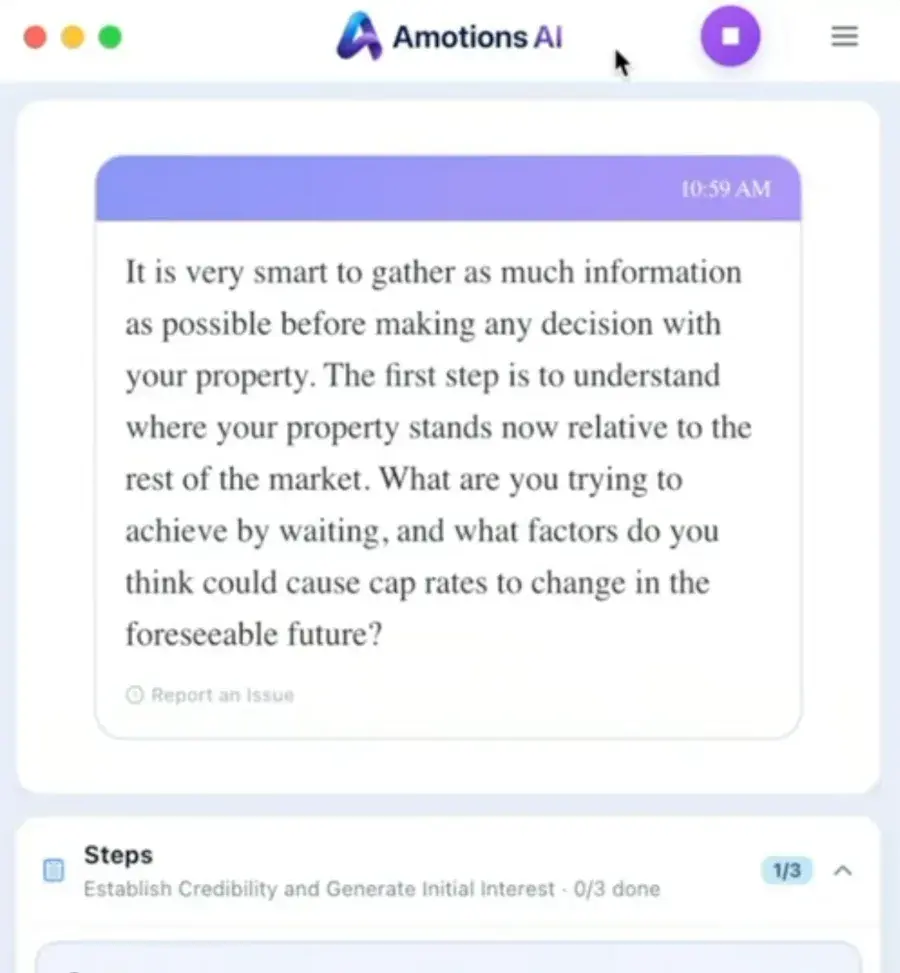
The dialer stays on screen and keeps running the call. The Amotions AI desktop app sits beside it and shows private suggestions and the step of the call the agent is on. The caller never sees or hears it.

  1. 1. Audio stays on the computer. The desktop app listens to computer audio, or the browser version listens to a shared tab with audio.
  2. 2. Guidance comes back to one screen. A timestamped suggestion appears for the agent only.
  3. 3. The dialer is unchanged. Queues, routing, dispositions and call controls stay in the dialer.
Real Amotions AI screenshot: the desktop app showing a timestamped live suggestion from a commercial-property call and a Steps tracker at 1 of 3
Real Amotions AI desktop app screenshot, cropped to the coaching panel.

How does Amotions AI work alongside a dialer?

The dialer keeps placing, routing and logging calls. Amotions AI runs next to it on the same Mac or Windows computer and listens to the call audio there, then shows private suggestions and the current step of the call on the agent’s screen. Nothing is added to the call, and the customer does not hear or see the coaching.

  • • Desktop app: listens to computer audio (headset or speaker routed through the computer)
  • • Browser version (Chrome or Edge): on a Mac, share the dialer’s browser tab with audio; on Windows, share the screen with system audio
  • • Guidance returns only to the agent’s overlay
  • • Not a native API: no access to campaigns, queues or dispositions

What audio path does the overlay need?

Both sides of the call have to be audible on the agent’s computer. That is the case when the dialer runs in a browser tab or softphone and the agent uses a headset or speaker through the computer. A desk or cell phone on speaker reaches the coach only through the computer microphone, with both voices on one channel, so pilot it before relying on it. On a Mac, the browser version hears browser-tab dialers only; desktop softphones on a Mac need the desktop app. Mobile-only agents with no computer are not a supported live path, so use upload.

  • • Browser or softphone dialer on a Mac or Windows computer
  • • Headset audio routed through the computer (cleanest), or the call on speaker near the computer microphone
  • • Mac + desktop softphone: use the desktop app, not the browser version
  • • Virtual desktops and locked-down images need a pilot with IT
  • • Upload is the fallback for any call that cannot be captured live

Which teams run Amotions AI beside a dialer?

Mortgage loan officers on outbound blocks, insurance agents and telesales teams, and contact-center or power-dialer floors that coach human agents. The common thread is volume: managers cannot listen to every call, so private prompts cover the live moment and uploaded or coached calls are scored for the next practice session.

  • • Mortgage: rate and timing objections, discovery, manager-approved reminders
  • • Insurance: price, spouse and "send me information" pushback
  • • Call centers: consistent talk tracks and process steps across a floor
  • • Appointment setters and SDR pods on power dialers

Does AI sales coaching also work with any CRM?

Live coaching does not depend on a CRM connector, so the CRM your team uses does not block a pilot. Salesforce is the only native CRM integration today, with sync and optional writeback. Other CRMs, including GoHighLevel and HubSpot, keep their data while Amotions AI coaches the call.

  • • Coaching runs independently of the CRM
  • • Salesforce: native sync and optional writeback
  • • Other CRMs: no native connector; export takeaways manually

Why choose overlay coaching instead of waiting for a dialer integration?

An overlay can be piloted on the dialer you run today, including mixed fleets where different teams use different dialers. The trade-off is honest: it needs a working computer audio path, and it cannot read dialer data such as dispositions. Teams that need an in-dialer whisper feature should look at their dialer’s own tools.

  • • Pilot on today’s dialer without a vendor project
  • • Same coaching across mixed dialer fleets
  • • Trade-off: no access to dialer data or in-dialer whisper

How do teams set up Amotions AI beside their dialer?

Keep the dialer and CRM. Prove the audio path with a small group, load the talk tracks, then widen once prompts arrive at useful moments.

  1. Step 1

    Pick a pilot group and dialer setup

    Choose three to five agents on one queue or campaign. Note the dialer, whether it runs in a browser or softphone, the headset setup and the operating system.

  2. Step 2

    Connect the audio path

    Install the desktop app and allow computer audio, or open the browser version and share the dialer tab with audio. Place a test call and confirm both sides are captured.

    Open this step
  3. Step 3

    Load approved talk tracks and objections

    Upload the scripts, objection responses and process steps agents already use, so prompts reinforce your language rather than a generic script.

  4. Step 4

    Coach live, then review scores

    Run live coaching for the pilot group, review scored calls and upload any calls that could not be captured, then assign AI roleplay on the weakest moments.

What matters when choosing AI coaching for a dialer floor?

Check the audio path first, then the coaching loop. A long logo wall matters less than whether both sides of the call reach the coach on your agents’ real computers.

Amotions AI dialer-agnostic sales coaching

Private desktop or browser overlay coaching beside existing dialers, with upload scoring and AI roleplay on the same playbook.

  • • Desktop app on computer audio, or browser tab-share with audio
  • • Private prompts and step tracking the caller never hears
  • • Upload of recordings or transcripts for post-call scoring
  • • AI roleplay before dials, trained on your talk tracks

Dialer-native tools vs Amotions AI overlay coaching

Dialer-native features see dialer data and can whisper inside the dialer. An overlay works across dialers but only sees the call audio on the agent’s computer.

Dialer-native coaching features vs Amotions AI overlay deployment
DimensionDialer-native coaching featuresAmotions AI overlay
SetupBuilt into one dialer; confirm availability with your dialer vendorDesktop app or browser tab-share beside any computer-based dialer
Dialer data (queues, dispositions)Usually availableNot accessed; the dialer stays the system of record
Mixed dialer fleetsOne dialer per toolSame coaching and playbook across dialers
Coaching loopConfirm with your dialer vendorAI roleplay before, private prompts during, scored calls after

Security & privacy

Enterprise-Grade Security & Data Privacy

Amotions AI coaches live conversations with a private overlay—it does not join Zoom as a bot. Enterprise buyers can review how conversation data is processed, isolated, and kept out of foundational-model training.

  • Policy

    Zero Model Training Policy

    Customer call transcripts, audio uploads, and chat sessions are strictly private to your organization. They are never used to train third-party foundational AI models. Playbook personalization applies your process at coaching time—it is not a claim that foundation-model weights are retrained on your conversations.

  • Healthcare

    Healthcare Data

    Data is hosted on Google Cloud, encrypted in transit and at rest, and isolated per workspace. Each practice sets its own patient notice policy for recorded conversations. We sign a Business Associate Agreement (BAA) with your practice, and our hosting provider, Google Cloud, is covered by a signed BAA with Amotions. Ask us for the BAA before you share patient information.

  • Infrastructure

    Data Isolation

    Coaching workloads run in isolated Google Cloud environments, including Cloud Run, with encrypted data transmission and encrypted storage. Organization playbooks, transcripts, and uploads stay separated by customer workspace. Ask security for current technical controls during enterprise evaluation.

Details: Privacy Policy · Healthcare security · Healthcare communication coaching · Talk to security
How this fits the full loop

Practice, live performance, and improvement are one system in Amotions AI — the same playbook and the same rubric run through all three.

  1. Practice

    Agents drill the hardest calls in the queue — cancellations, escalations, compliance moments — before taking them live.

    AI roleplay for agents →
  2. PerformYou are here

    On the call, the assist gives one read and one line, fast enough to use without slowing the queue.

    Live agent assist →
  3. Improve

    Every contact is scored, so QA covers the whole floor instead of a sampled handful, and drills are assigned from real calls.

    AI call scoring →

AI coaching for Five9

No native Five9 API. Pilot the desktop app on computer audio or a browser tab-share beside Five9, or upload recordings.

AI coaching for ViciDial

No native ViciDial API. Desktop app or browser overlay beside the agent screen with headset or speaker audio, plus upload scoring.

AI coaching for GoHighLevel

No native GHL app. Overlay beside GHL calling when audio is shareable on a computer, plus upload scoring.

AI coaching for CallTools

No native CallTools API. Browser or desktop overlay when CallTools audio is shareable, plus upload scoring.

AI coaching for Aircall

No native Aircall API. Pilot the desktop app or a browser tab-share for Aircall calls on a computer.

AI coaching for Dialpad

Not a native Dialpad integration. Evaluate overlay coaching beside computer-based Dialpad calls.

AI coaching for RingCentral

No native RingCentral API. Pilot the desktop app or a browser tab-share for RingCentral calls on a computer.

AI coaching for Kixie

No native Kixie API. Desktop app or browser overlay when Kixie calls run on the computer, not a cell phone.

AI coaching for PhoneBurner

No native PhoneBurner API. Coach calls connected through the computer; “call my phone” mode cannot be coached live.

AI coaching for JustCall

No native JustCall API. Works beside the JustCall web or desktop app; the mobile app cannot be coached live.

AI coaching for Readymode

No native Readymode API. Overlay beside the browser agent screen for predictive-dialer floors, plus upload scoring.

AI coaching for Convoso

No native Convoso API. Overlay beside the agent screen for insurance and Medicare floors; your team sets the playbook.

AI coaching for Velocify

No native Velocify API. Overlay for loan officers on speed-to-lead calls taken on the computer.

AI coaching for Mojo Dialer

No native Mojo API. Coach expired and FSBO calls when the audio runs through the computer.

AI coaching for BatchDialer

No native BatchDialer API. Overlay for wholesalers on motivated-seller calls, plus upload scoring.

AI coaching for Close

No native Close integration or write-back. Overlay beside Close calling in the desktop app or browser.

AI coaching for OpenPhone

No native OpenPhone API. Works beside the desktop or web app; mobile calls cannot be coached live.

AI sales coaching for call centers

Overlay coaching for human agents on contact-center floors, not a CCaaS replacement.

Mortgage and loan officer coaching

Live prompts for rate, timing and trust objections on loan officer calls.

Insurance sales coaching

Private rebuttal and process prompts for insurance agents on the phone.

Frequently asked questions

Does AI sales coaching work with any dialer or CRM?

Yes, when the call runs on a computer. Amotions AI works beside the dialer as a private desktop or browser overlay that listens to the call audio on the agent's computer. No native dialer API or CRM connector is required, and recordings can be uploaded for scoring when live capture is not possible.

Is there an AI sales tool that works with my dialer?

Amotions AI is built for that search. Overlay coaching runs beside Five9, ViciDial, CallTools, GoHighLevel, Aircall, Dialpad, RingCentral and other computer-based dialers, so you keep the dialer you already run. Pilot the audio path on your agents' real setup first.

Do I need a direct integration with my dialer?

No. A native dialer integration is not required. Amotions AI coaches through the desktop app on computer audio or a browser tab-share with audio. It does not read or change dialer campaigns, queues or dispositions.

Will Amotions AI slow down my calls?

Amotions AI listens to the audio already on the agent's computer and shows prompts on screen; it does not sit between the agent and the caller or reroute the call. Check that prompts arrive at useful moments during a pilot on your real network and devices.

Which dialers have their own Amotions AI page?
Five9 (/ai-for-five9), ViciDial (/integrations/vicidial), GoHighLevel, CallTools, Aircall (/ai-for-aircall), Dialpad (/ai-for-dialpad) and RingCentral (/ai-for-ringcentral). None is a native API integration; each page explains the overlay and upload path for that dialer.
Does the customer hear or see the coaching?

No. Prompts appear only on the agent’s screen and are not spoken into the call. Your organization remains responsible for any recording, transcription or AI-processing notices your calls require.

Does this work if we also use a CRM like GoHighLevel or Salesforce?

Today, only Salesforce has a native CRM integration in Amotions AI. An org admin connects Salesforce via OAuth in Org Admin Center, manually syncs Accounts, Contacts, Opportunities, and Leads into Amotions, and can optionally enable CRM writeback. HubSpot, GoHighLevel, and Pipedrive do not have native connectors—they appear only as onboarding CRM dropdown labels. There is no OAuth, sync, or writeback for those CRMs in product today. If you use another CRM, you can still record, score, and coach in Amotions; automatic CRM push requires Salesforce writeback or a manual workflow. Live coaching does not require a CRM connector—GoHighLevel has no native CRM sync in Amotions today. See /integrations/crm for which CRMs connect today and exactly what data is pushed—Salesforce is native; HubSpot and others use export-ready takeaways.

Ready to see Amotions AI on a live call?

Book a walkthrough of real-time coaching, AI roleplay, and post-call feedback tailored to your team.

Book a dialer coaching demoBrowse platform integrations

See it on your own conversations.

Start free on Basic, or watch live coaching on a simulated call first. No bot joins your calls.

+$160Kmonthly sales · House of HearingCustomer-reported
“Amotions AI is extremely useful for installing those fundamentals…”
David, Senior Leader · Top US Commercial Real Estate Firm