ENVIRONMENT · IN-HOUSE CONTACT CENTERS

AI sales coaching for call centers: live help on every coached call

In-house call-center floors run on ViciDial, GoHighLevel, CallTools, or a browser dialer, and managers cannot hear every call. Amotions AI sits beside that dialer as a private overlay: agents rehearse the script in AI roleplay, see short prompts and a call-step tracker on live inbound and outbound calls, and get a score after each coached call.

What Amotions AI shows an agent mid-conversation

Amotions AI · Live agent assist
Live agent assist · insurance telesales floor · licensed agents, scripted product
  • Prospect04:02

    Is this going to go up every year like my last one did?

Amotions AI

Detected
Objection · Rate-stability question · compliance-sensitive

Prior bad experience; an absolute reassurance would breach script rules

Recommended

Do not promise stability. Explain the mechanism and where it is guaranteed.

Say this

“I can't promise it never changes — anyone who does is guessing. What I can show you is which part of this premium is locked and for how long.”

  • Prospect04:21

    Okay, that's the first straight answer I've had. Show me.

Result

The compliant answer outperformed the reassurance the agent was about to give.

What Amotions AI shows an agent mid-conversation. The assist keeps scripted floors compliant and conversational at once: it flags the risky phrasing and offers the compliant rebuttal live.
Book a call-center coaching demoView product
See Your Call Center’s Playbook in Action

Published Updated By Pianpian Xu Guthrie, Founder and CEO

What is AI sales coaching for call centers?

AI sales coaching for call centers is software that trains and guides the agents on an inbound or outbound floor across the full conversation loop: AI roleplay before calls, private real-time prompts during calls, and transcript-backed scoring afterward, including unsuccessful calls. It is a coaching overlay beside the dialer or CCaaS the team already uses, not a replacement phone system.

What the agent sees during a live call

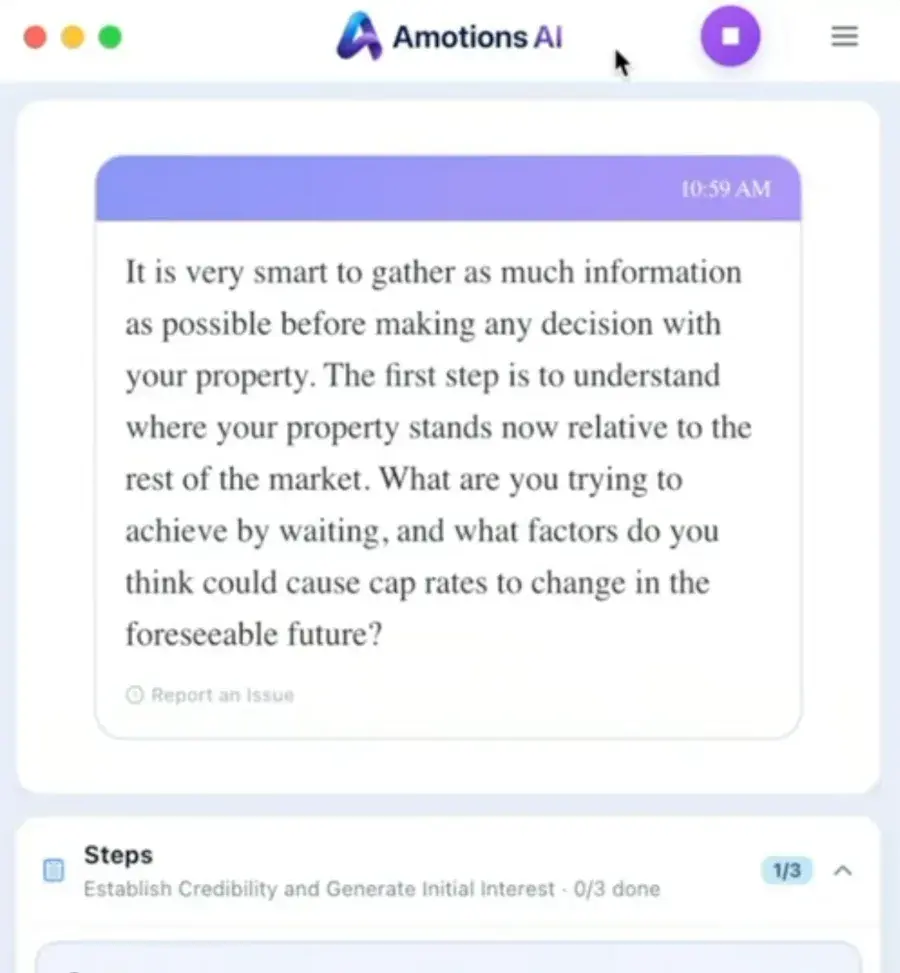
A real Amotions AI desktop app screenshot. The suggestion card and the Steps tracker sit on the agent’s screen only; the caller never sees or hears them.

Real Amotions AI screenshot: the desktop app showing a live suggestion card and a Steps tracker with one of three steps done
Real Amotions AI desktop app screenshot, cropped to the coaching panel. This call was a commercial-property conversation; on your floor the steps and suggestions come from your own script.

What is AI sales coaching for call centers?

It is a coaching loop for the agents on your own inbound and outbound floor. Amotions AI helps agents practice before the shift, gives private guidance during coached calls, and delivers transcript-backed scores and coaching notes afterward, including on calls that never book an appointment.

  • • For in-house sales, appointment-setting, and retention floors
  • • Covers practice, live guidance, and post-call review in one loop
  • • Includes unsuccessful calls so coaching is not limited to wins

Which call-center floors is this page for?

Teams that employ their own agents and run their own queues: outbound sales and appointment-setting floors, inbound sales lines, and callback teams working a dialer every day. If you are a BPO or virtual agency calling on behalf of several clients, the virtual-agency page covers the multi-client version.

  • • Outbound sales and appointment-setting pods
  • • Inbound sales lines and web-lead callback teams
  • • One company playbook, many agents, managers who cannot hear every call

How does Amotions keep agents on the script during a live call?

Load the script as steps. During the call, a Steps tracker shows which steps the agent has covered and which are still open, and a suggestion card offers the next line when the caller objects or drifts. After the call, the scorecard shows which steps were skipped, so coaching targets the gap instead of the whole script.

  • • Steps tracker with progress on the agent’s screen during the call
  • • Suggestion cards and reminders drawn from your approved script
  • • Post-call scorecard shows skipped steps and weak objection replies

Will live prompts distract agents mid-call?

Prompts are short text cards, not paragraphs: a suggested line, a reminder, or the next open step. Agents glance, then say it in their own words and their own voice. Amotions never speaks on the call. Test prompt length and transcription quality on your own agents in a pilot before rolling out to the full floor.

  • • Short suggestion and reminder cards, private to the agent
  • • Agents paraphrase in their own voice; Amotions never talks to the caller
  • • Pilot on a small pod first to check prompts and transcription

How does Amotions coach before, during, and after every call?

Before the shift, agents rehearse openers, objections, and appointment closes with AI roleplay. During a coached call, private prompts guide script adherence, objection recovery, and next steps. After the call, Amotions delivers a transcript, call score, and coaching notes so agents and managers can improve the next dial.

  • • Before: AI roleplay for openers, objections, and appointment asks
  • • During: private prompts on live inbound and outbound calls
  • • After: transcript, scoring, and coaching on every coached call

Why coach unsuccessful calls, not only booked appointments?

Most call analysis focuses on selected or successful calls, which hides why appointments are not created. Amotions coaches every conversation it is enabled on, including unsuccessful dials, so managers can see missed opportunities, weak objection handling, and script gaps that quietly drain conversion.

  • • Failed-call analysis explains why appointments were not set
  • • Missed opportunities become coaching inputs, not discarded dials
  • • Managers coach the full queue instead of cherry-picked wins

Is this a contact-center platform or a coaching overlay?

Amotions is conversation coaching for people who already work in a contact center or on a dialer. It is not a CCaaS, ACD, or phone system. ViciDial, GoHighLevel, CallTools, Five9, browser dialers, Zoom, Teams, and Meet remain where calls are placed and routed. Amotions sits beside them when audio can be captured on the agent’s computer, or scores uploads when live capture is not appropriate.

  • • Environment layer: phone, dialer, and meeting audio where agents sell
  • • Integration pages document native vs overlay vs unsupported for each stack
  • • No claim that Amotions replaces your dialer, CCaaS, or carrier

Can we bring our own call-center playbook?

Yes. Teams configure Amotions with their own scripts, opening statements, qualification questions, objection-handling guides, and appointment criteria, so roleplay and live prompts reflect the floor’s actual process instead of a generic script library.

  • • Upload scripts, opening statements, and qualification criteria
  • • Configure objection-handling guides and approved responses
  • • Coaching reflects your process, not a generic script

What do call-center managers see?

Managers see scored calls across the team: script adherence, objection patterns, missed opportunities, talk/listen balance, failed-call themes, and each agent’s coaching needs. That turns a busy floor into a coaching system without leaders personally reviewing every recording.

  • • Team trends for script adherence and objection handling
  • • Failed-call themes that explain appointment leakage
  • • Agent coaching priorities based on scored conversations

Does this work with ViciDial, GoHighLevel, CallTools, browser dialers, and Five9?

Amotions works alongside those systems when call audio is available on a Mac or Windows computer or a shareable browser tab. There is no native ViciDial, GoHighLevel, CallTools, or Five9 API: Amotions does not control campaigns, queues, dispositions, or dialer pacing. Five9 works only through the computer-audio overlay. Validate audio routing in a pilot; upload remains available for scoring when live capture is blocked.

  • • Overlay on computer audio, not a native dialer or CCaaS connector
  • • Dedicated pages for ViciDial, GoHighLevel, CallTools, and Five9
  • • Complements your dialer and CRM; does not replace them

How do outbound call centers roll out Amotions AI?

Start with the dials that decide appointment rate—openers, objections, and booking asks—then expand every-call coaching once sellers trust the prompts.

  1. Step 1

    Load talk tracks and appointment criteria

    Capture approved openers, objection responses, qualification rules, and appointment closes so roleplay and live prompts match your call-center playbook.

  2. Step 2

    Practice before the shift with AI roleplay

    Have appointment setters and outbound sellers rehearse top objections and booking asks until scores show readiness for live queues.

  3. Step 3

    Enable real-time guidance on every dial

    Turn on private in-call prompts for live outbound conversations so coaching happens while conversion is still possible.

  4. Step 4

    Review transcripts, scores, and failed-call themes

    Use after-call scoring and aggregate manager insights—including unsuccessful calls—to coach sales professionals and fix team trends.

What Amotions AI capabilities matter for call centers?

Call-center and appointment-setting leaders should prioritize every-conversation coverage, live objection support, failed-call analysis, and manager visibility at volume—not dashboards built only from selected wins.

Amotions AI sales coaching for call centers

AI sales coaching for high-volume outbound and appointment-setting call centers with roleplay, real-time guidance, and every-call scoring.

  • • AI roleplay before the shift for openers, objections, and appointment asks
  • • Real-time guidance during every coached outbound dial
  • • Transcript, scoring, and coaching after every call
  • • Script adherence, objection detection, missed opportunities, and talk/listen signals
  • • Failed-call analysis for why appointments were not created
  • • Rep coaching notes and aggregate team trends for managers

Call-center coaching: selective QA vs Amotions AI

Compare selective call review with every-conversation AI sales coaching for outbound call centers.

Outbound call-center coaching before and with Amotions AI
DimensionSelective call analysisWith Amotions AI
CoverageSelected or successful callsEvery coached conversation, including failed dials
TimingMostly after the shiftBefore, during, and after every call
Appointment leakageHard to see why bookings failFailed-call analysis and missed opportunities
Manager insightSpot checks and win reviewsAggregate team trends and seller coaching priorities
Stack fitOften tied to one recording or CCaaS workflowOverlay alongside existing dialers and meeting tools—not a phone-system replacement

Security & privacy

Enterprise-Grade Security & Data Privacy

Amotions AI coaches live conversations with a private overlay—it does not join Zoom as a bot. Enterprise buyers can review how conversation data is processed, isolated, and kept out of foundational-model training.

  • Policy

    Zero Model Training Policy

    Customer call transcripts, audio uploads, and chat sessions are strictly private to your organization. They are never used to train third-party foundational AI models. Playbook personalization applies your process at coaching time—it is not a claim that foundation-model weights are retrained on your conversations.

  • Healthcare

    Healthcare Data

    Data is hosted on Google Cloud, encrypted in transit and at rest, and isolated per workspace. Each practice sets its own patient notice policy for recorded conversations. We sign a Business Associate Agreement (BAA) with your practice, and our hosting provider, Google Cloud, is covered by a signed BAA with Amotions. Ask us for the BAA before you share patient information.

  • Infrastructure

    Data Isolation

    Coaching workloads run in isolated Google Cloud environments, including Cloud Run, with encrypted data transmission and encrypted storage. Organization playbooks, transcripts, and uploads stay separated by customer workspace. Ask security for current technical controls during enterprise evaluation.

Details: Privacy Policy · Healthcare security · Healthcare communication coaching · Talk to security
How this fits the full loop

Practice, live performance, and improvement are one system in Amotions AI — the same playbook and the same rubric run through all three.

  1. Practice

    Agents drill the hardest calls in the queue — cancellations, escalations, compliance moments — before taking them live.

    AI roleplay for agents →
  2. PerformYou are here

    On the call, the assist gives one read and one line, fast enough to use without slowing the queue.

    Live agent assist →
  3. Improve

    Every contact is scored, so QA covers the whole floor instead of a sampled handful, and drills are assigned from real calls.

    AI call scoring →

Book an Amotions AI demo with your sales talk tracks

Request a live walkthrough of real-time coaching and AI roleplay for your team.

AI sales coaching for virtual agencies and appointment-setting teams

One Amotions deployment, per-client playbooks—coaching for virtual agencies, BPOs, and outsourced sales teams running multiple campaigns.

AI coaching for retention and save calls

Private live suggestions on cancellation calls, from your own save playbook.

AI coach for outbound appointment-setting teams

Live coaching on every dial—including unsuccessful calls—for global and offshore appointment setters.

AI sales coaching that works with any dialer or CRM

Browser or desktop overlay for CallTools, browser-based dialers, and Zoom/video—no native dialer integration required.

AI live sales coach for power dialers (GHL, CallTools, ViciDial)

Roleplay → live rebuttal assist → MSCEIT-informed scoring via overlay/upload—no native dialer APIs.

AI sales coach for ViciDial

No native ViciDial API—desktop app / overlay on the agent screen with speaker or headset audio routing, plus upload scoring.

AI sales coach for Five9

No native Five9 API—desktop or browser audio overlay for live coaching, plus upload scoring for contact-center queues.

Amotions AI integrations and platform compatibility

See factual native, overlay, upload, and unsupported compatibility for Zoom, Teams, Meet, Salesforce, dialers, and CRMs.

AI call scoring with MSCEIT-informed scorecards

Skill-specific call scores managers and sellers can coach from.

AI that you can use in your sales calls live to handle objections

Need AI objection handling? Private live prompts and AI rebuttal suggestions.

AI sales roleplay practice before live calls

Rehearse discovery, objections, and closes with score-based feedback.

Amotions AI product overview for real-time call coaching

See how Amotions AI combines live guidance, AI roleplay, and post-call feedback in one platform.

Frequently asked questions

What is AI sales coaching for call centers?

AI sales coaching for call centers is a continuous coaching loop for high-volume outbound and appointment-setting teams: AI roleplay before the shift, real-time guidance during every dial, and transcript-backed scoring and coaching after every call—including unsuccessful ones.

How is this different from call analysis that reviews selected wins?

Most call analysis systems focus on selected or successful calls. Amotions AI coaches every conversation it is enabled on—including failed dials—so managers can see why appointments were not created and fix leakage across the full queue.

Does Amotions AI support AI coaching for appointment setters?

Yes. Appointment setters rehearse booking asks and objections in AI roleplay, get private prompts on live dials, and review post-call notes that explain whether the appointment ask was clear and why the call did or did not book.

Is Amotions AI useful for AI sales coaching for high volume sales teams?

Yes. High-volume outbound teams use Amotions AI when managers cannot join every dial and need consistent script adherence, objection handling, talk/listen coaching, and team trends without linear headcount growth.

Does it work with the sales tools and browser-based dialers teams already use?

Amotions AI layers onto existing sales tools and browser-based calling workflows—Zoom, Teams, Meet, phone, and browser call audio via the desktop app or Chrome Real-time AI—without replacing your dialer or CRM.

Does Amotions work on inbound call-center floors as well as outbound?

Yes. The overlay listens to whatever call is running on the agent’s computer, so inbound sales lines and callback queues are coached the same way as outbound dials: private prompts during the call and a score afterward.

Does Amotions integrate natively with VICIdial or Five9?

No. Amotions does not provide a native VICIdial or Five9 API and does not control campaigns, queues, or call routing. Teams can evaluate live coaching when the call runs on a computer through the Desktop App or Web Real-time AI, and can upload recordings or transcripts for scoring. See the ViciDial and Five9 pages for the exact overlay statement.

Is this the right page for a BPO or offshore appointment-setting agency?

Partly. The coaching is the same, but agencies calling US prospects for several clients need a separate playbook per client campaign. The virtual-agency page covers that operating model; this page covers in-house floors running one company playbook.

Does Amotions AI replace our dialer or CRM?

No. Amotions AI is a coaching overlay that works alongside your existing sales tools and computer-based calling workflows. It does not replace your dialer, CCaaS, phone system, or CRM, and it does not claim native APIs for VICIdial, Five9, CallTools, or GoHighLevel.

Ready to see Amotions AI on a live call?

Book a walkthrough of real-time coaching, AI roleplay, and post-call feedback tailored to your team.

Book a call-center coaching demoView product

See it on your own conversations.

Start free on Basic, or watch live coaching on a simulated call first. No bot joins your calls.

+$160Kmonthly sales · House of HearingCustomer-reported
“Amotions AI is extremely useful for installing those fundamentals…”
David, Senior Leader · Top US Commercial Real Estate Firm